



Opening the Performance Max black box
Daniel Szenes
· 10 min
The Performance Max black box is less opaque than it looks, for anyone who knows where to search. But Google’s AI has to be fed good data and guided by a human who keeps the company’s real objectives in view.
Swipe left to read
Keep reading
The Performance Max black box is less opaque than it looks, for anyone who knows where to search. But Google’s AI has to be fed good data and guided by a human who keeps the company’s real objectives in view.
Pmax: what is it?
If you have followed digital marketing news over the past three years, you have certainly heard of Performance Max campaigns on Google Ads. These are campaigns that let you appear across Google’s whole inventory — Search, Shopping, YouTube, Display, Discovery, Gmail and Google Maps placements — with a single campaign. The aim, as the name says, is to maximise performance against the objective we give the campaign, by giving Google’s algorithm the greatest possible freedom over creative assets, placement and targeting.
What is at stake
The freedom we give Pmax campaigns has drawbacks for those of us used to following our campaigns’ results in detail and having the control needed to optimise them on the basis of those results. We have to trust the black box of Google’s algorithm, and so we lose visibility. We cannot, for instance, properly see how much is spent on each placement (Search, Display, YouTube and so on), still less get detail on the search terms for the part of the campaign spent on Search.
Without visibility we logically have no control over those elements either. We cannot tell the campaign directly to spend less on YouTube, or not to appear on irrelevant search terms. The idea being that this should happen automatically if the tracking is well configured and if we send the campaign the right signals.
Since this is the campaign type where we have to put the most trust in Google’s algorithm, it is of course the best campaign for optimising your performance… according to Google.
In the rest of this article we will explore what we can do to make sure these campaigns really do add value, and also mention a few important traps to avoid.
Best practices for the setup
To maximise your chances of success with Pmax campaigns, there are certain things to pay attention to before launching:
Data and objectives: in a Pmax campaign, which has more freedom than a classic campaign, it is essential to put in place data tracking that captures the crucial events of your funnel. What is more, with third-party cookies disappearing, it matters to use advanced tracking methods such as consent mode or enhanced conversion tracking. Once that is done, you have to choose carefully which stage of your funnel you will optimise the campaign on. Ideally, choose the conversion furthest down your funnel that still meets the minimum rules for Smart Bidding to work: 15 events a month, and fewer than 90 days of conversion time from the day of the click. Finally, you have to decide whether it is more relevant to give values to your conversions and bid with a target ROI, or to give all your conversions the same value and bid on CPA. Adjusting those bids is then part of the recurring work, as with any Google Ads campaign.
Creative assets: here the rule is simple — the more copy and visuals you give your Pmax campaign to test, the better it will fare. That matters not only in terms of assets to test, but also so that your campaign can be served across every placement.
Automatically created assets: this is a feature you can switch on to give Google more freedom over creative assets. We can let it create and use new copy, and we can even let it run its own tests on landing pages. The latter can be particularly powerful, but also dangerous, since the algorithm may choose to experiment with any page of your site as a landing page. So it matters to be aware of that, and to actually want traffic driven to any page of your site.
Update, September 2026: on Search campaigns, AI Max now absorbs and replaces these automatically created assets.
Targeting possibilities:
- As with other campaign types, you can choose the languages and the countries you want to target. If you plan to target a multitude of countries or regions, the Pmax campaign could quickly concentrate on some of them, which would bring in a lot of traffic that is not necessarily qualified. So it is a genuine strategic question to ask when launching the campaign.
- Beyond that, if you want your campaign to be a true acquisition campaign, it is strongly advised to exclude your own brand through a negative brand list applied to the campaign. Otherwise your Pmax campaign will go looking for, and claim credit for, the best-performing traffic — which will inevitably be largely people who already know the brand, but who did not come to know it through the Pmax campaign.
- Finally, you can attach certain audiences to your campaign in order to give it ideas about the profile you are looking for. That audience can be built from your Analytics account’s data, from interest groups defined within Google, or even from certain competing sites or applications defined as similar to our brand. These audience signals are not a strict targeting method, and we cannot know how Google takes them into account — but in every case they let you give your campaign some indication, up front, of the kind of customer you are after.
Reporting: how do we see what is hidden from us?
The black box of Pmax campaigns is not necessarily as opaque as we may think. If we know where to search, there are several ways of gaining visibility on what goes on inside.
The Insights page
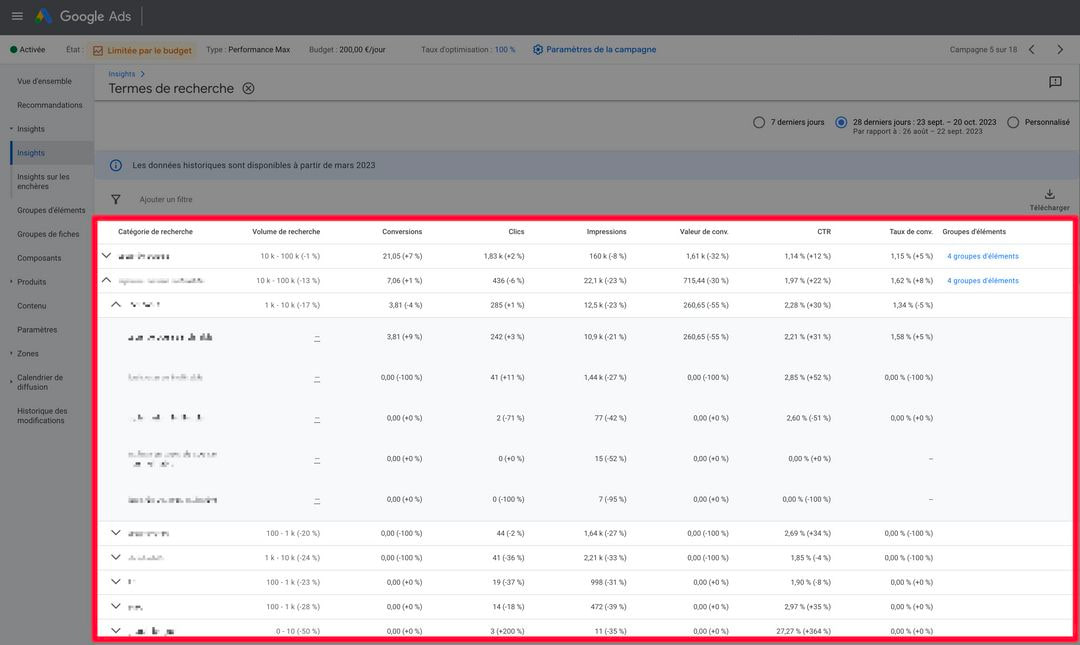
This is something we can look at for all Google campaigns, but for Pmax campaigns this page is especially precious, because we really do find information there that we cannot see anywhere else: where our ads sit relative to competitors’, the performance of the different audience segments, and the copy and visuals that speak most to those segments.
But the most important element we find here is the search terms, for which we can find a section with almost all the figures we have in a search terms report for a classic Search campaign. Among the usual metrics only cost is missing; otherwise we can see fairly well which search terms generate the most traffic or the most conversions. That can be useful for seeing whether you appear too often on irrelevant search terms, or on your own brand if it is not excluded from your campaign.
The reports
We can find a report on Pmax placements in the Google Ads account’s predefined reports. Here you will mainly see the Display placements served on external properties — that is, web pages and mobile applications. Everything on Google’s other owned channels (Search, Shopping and so on) will all be filed under a category called “Google owned and operated properties”. Another limit of this view is that impressions are the only volume variable we get, so we do not know which placements bring conversions. Even so, this view can be useful for seeing how relevant the various sites and apps are to your business. At bright we have observed on Pmax campaigns that the quality of these placements tends to improve if the campaign is well configured.
If you switch on automatically created assets and let the algorithm test different pages of your site for the campaign, it is also possible to build a report to see the results of those tests. You simply create a report with landing page as the dimension and a filter on campaign type, so as to see only the Pmax results. This time we can see the detail for the metrics we want, notably cost and CPA. That lets you see whether the campaign is using irrelevant pages, and how the various pages perform more broadly. It also lets you connect back to the Insights page, since often, if we see odd things among the search terms, it is because there is a page of the site where the keyword appears.
The scripts
Finally, we can also use Google Ads scripts to pull certain information into a report exported to a Google Sheet. At bright we have, in particular, a script that gives a very clear view of performance by Google channel for accounts with a product feed in place in Merchant Center. What we have observed generally on Pmax campaigns that work well is that they tend to spend almost everything on the Shopping and Search placements — which are already the best performing to begin with. Pmax campaigns are therefore not magic tools for making YouTube your main acquisition channel, and the question of overlap arises in earnest. Competing with the search terms already covered in Search and Shopping is a significant challenge, even though Google insists these campaigns are complementary.
The levers of control: mastering Google’s algorithm
Visibility on these various elements is ultimately of little use if we have no way of acting on them. If the optimisation possibilities are more limited for Pmax campaigns, it matters all the more to know the few levers we do have at our disposal.
Basic optimisations
First of all, we can of course change the elements we discussed in the setup section. In particular:
- Adding visual assets or copy.
- Changing the campaign’s optimisation conversion, or the target CPA or target ROAS bids.
- Adding or excluding geographic areas, or changing the targeting at the language level.
- Adjusting audience signals or search themes at the asset group level.
That already gives us significant levers of control, especially if you have a campaign targeting several countries.
Important exclusions
Based on what we see in the detailed reporting, it is also possible to exclude more specific elements.
At the level of search terms, we can not only exclude our own brand (which we recommend doing before launch), but also exclude competitors’ brands or those of other companies you might see in your search terms report in the Insights section. The limitation of this method is that we can only exclude brands that have a separate site and domain — not any keyword at all, as we could with a negative keyword list for Search campaigns. There is also the possibility of excluding certain keywords across the whole account, and that exclusion will apply to your Pmax campaign too. Finally, if we want to exclude certain keywords on specific campaigns, that is also feasible by asking your Google Account Manager to do it. For that to be possible you obviously have to have an AM assigned to your account and keep a professional relationship with them, which we do on all our accounts at bright.
If we switch on automatically created assets and analyse the landing pages described above, we will observe that some landing pages perform better than others on CPA, ROI or profit. The URLs that perform less well you can exclude at the level of your Pmax campaign. That way you keep giving the algorithm the freedom to test your site’s pages, while also guiding it by keeping the pages that perform. It is an important recurring optimisation to carry out, like cleaning up the search terms of a Search campaign.
Gemini: a reliable AI assistant for building your campaigns?
As you will have gathered, the power of AI is at the heart of Pmax campaigns. We can even see these campaigns as a competitive battleground in the global race for AI supremacy among the big platforms. While Microsoft has announced it is launching Pmax campaigns too, which will soon be importable from Google Ads, Google is trying to catch up with Microsoft on generative AI, notably by integrating its new Gemini model into Pmax campaigns. That can be a powerful tool for creating quality images for Shopping and Display placements while saving your creative team’s resources. That said, we would advise checking the generated images’ results carefully, given the difficulties encountered by the version of Gemini recently made available to the general public.
Conclusion: should you run Pmax campaigns?
In our view it can work very well if you follow the best practices we have just listed and watch out for the various traps and risks these campaigns carry. From what we have observed, these campaigns are particularly powerful when we want to enter a new market where we are less well known, since the risk of overlapping with the brand’s search terms is smaller. Google’s AI is powerful, but it has to be fed good quality data and guided by a human being who knows how to analyse the campaign’s results while keeping the company’s real objectives in view. It is that human guidance which is at the heart of the work we do for all our clients, whether on data tracking, data science or campaign management. During the audit of QoQa’s accounts we identified Performance Max campaigns as an opportunity.
The series : Google Ads, from Performance Max to AI Max



- Performance management19 publications
- Search and Google Ads11 publications
The key skills bright can bring to you