



What server-side GTM brings
Darko Macoritto
· 4 min
By passing the data through your own server, server-side tracking gains in performance, in data quality and in control. It does not, however, excuse you from gathering users’ consent.
Swipe left to read
Keep reading
By passing the data through your own server, server-side tracking gains in performance, in data quality and in control. It does not, however, excuse you from gathering users’ consent.
Introduction
In a digital world where regulation has begun to weigh significantly on data collection, it is essential to make sure the data that may lawfully be gathered is collected in the most dependable and relevant way.
Among the options available, server-side tracking offers a more dependable method for collecting your site’s data than classic web tracking.
How it works
Let us assume Google Tag Manager (GTM) is used to track the digital data. GTM is a tool that makes setting up tracking far easier, since it lets you put a complete tracking plan in place with basic coding skills.
When using GTM, two options are open to us:
- Web-side tracking
- Server-side tracking
Web-side tracking
Web-side tracking can be represented by the diagram below:
On the server side, the browser has a single recipient: your server
The path of the tracking data collected with Google Tag Manager (GTM), from the user’s browser to the advertising and analytics providers, by tagging architecture.
Source: the article’s diagrams, redrawn · Chart: bright.swiss
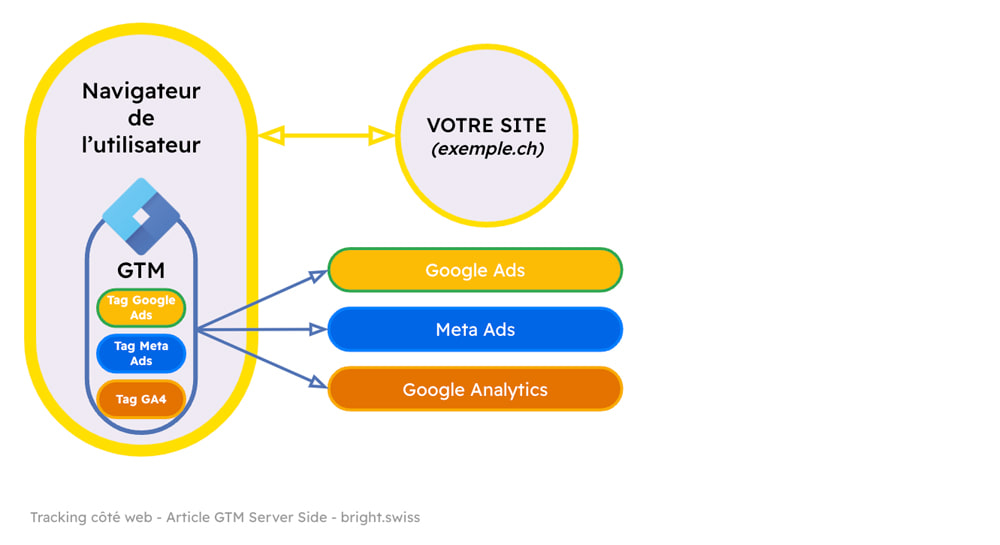
The user browses your site through a browser — Google Chrome, say — which takes care of displaying it. On specific actions you have defined beforehand in GTM (a purchase on your site, for instance), the user’s browser sends data to external providers. Among those providers are the companies through which you run advertising, and the platforms that let you monitor what happens on the site. Google Ads or Meta Ads are common for advertising services, and Google Analytics for following the statistics.
It matters to note that it is your potential customer’s browser that sends the data, which is therefore subject to the constraints the browser imposes and to the plugins the user has installed. Ad blockers come to mind, which often have features well beyond simply blocking advertising. When the ad blocker notices that your data is being sent to third parties — notably to Meta and Google — it may block the flow, even if the user has accepted cookies.
Server-side tracking
Server-side tracking can be represented by the diagram below:
On the server side, the browser has a single recipient: your server
The path of the tracking data collected with Google Tag Manager (GTM), from the user’s browser to the advertising and analytics providers, by tagging architecture.
Source: the article’s diagrams, redrawn · Chart: bright.swiss
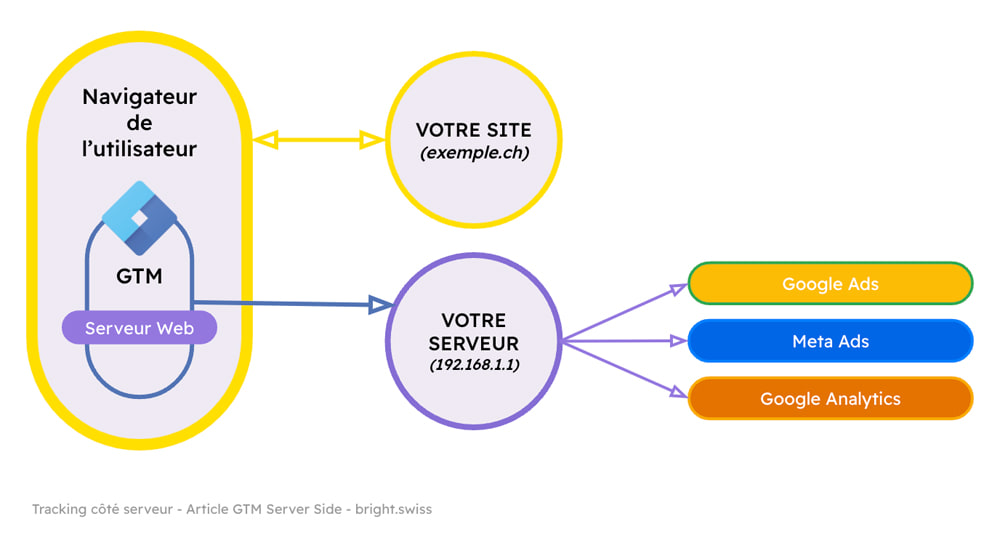
Unlike web-side tracking, the browser this time sends the data to your server, which then sends it on to the various providers. That extra step, while it adds some complexity to the architecture, has several benefits:
- If an ad blocker is present, it cannot see that data is being sent to external providers, because the data goes first to your server — only at that moment can the ad blocker intervene. Thereafter, the data sent to the providers is invisible to the ad blocker and therefore not subject to its interference.
- Page load time is not slowed, or barely. In this configuration the browser sends data to a single recipient, your server, which then takes care of distributing it to the providers. With the web-side setup, by contrast, the browser has to send the information to every provider. If there are many, that can slow your site down — which also harms the UX and your SEO ranking.
- As the site’s owner, you have a hand on the data you send to providers, since it goes to your server first. It is therefore entirely possible for you to send your providers only what you find relevant, and to store the rest for other uses, such as analysis.
- Since the data collected is sent to your server, the cookies needed are first-party cookies — as opposed to the third-party cookies of the web-side solution. First-party cookies having a longer life than third-party ones, you can follow visitors’ behaviour across their visits better and collect data of higher quality. Server-side tracking notably extends the life of first-party cookies in the Safari browser, which accepts them but limits them in time compared with other browsers.
And the GDPR?
The data going to your server does not mean you need not comply with the laws in force, in particular the law on personal data protection.
It is therefore still necessary to gather users’ consent if you wish to collect personal data and share it with external providers — whatever the architecture you have put in place to track your data.
Conclusion
Server-side tracking has several advantages in performance, in the quality of the data collected and in control. We strongly recommend putting this kind of method in place when your performance depends heavily on SEO, or when your site has to collect sensitive customer data. In 2026, the migration to the Google Tag Gateway answers the same logic — taking back control of the data flow before it leaves for third parties — as we explain in our reading of Google Marketing Live 2026.
Going further
- Tracking and data collection8 publications



The key skills bright can bring to you